The fastest camera feed is no video at all
tldrPutting the driveway camera on a screen turned into a lesson in why live video is always late. Tuning the player got it from 12 seconds to 5. Swapping video for JPEG snapshots got it to none.
This one started as “put the driveway camera on a screen” and turned into a small lesson about why live video is late, and what to do instead. It sits alongside the wall panel, the cloud-locked LED controller and the rest of the house I run from Claude Code.
The short version: my outdoor IP cameras showed up twelve seconds behind reality on a cheap display: an old Android photo frame I’d reclaimed, which is a story for another time. The usual fixes got it to five. Then I gave up on video entirely, and a small Python file serving JPEG snapshots twice a second now shows the same second the camera does.
Measure before you tune
I wanted just the cameras, full screen, current. Every guide says RTSP, so I pointed a player at the camera’s RTSP URL. The picture was uselessly late: someone could walk up, ring the bell, and still not be on screen.
Before changing anything I wanted a real number. My cameras burn a clock into the corner of the image, as most do, so I captured the display and the camera stream at the same instant and compared the two timestamps:
adb exec-out screencap -p > frame.png &                     # what the screen shows
ffmpeg -rtsp_transport tcp -i "$URL" -frames:v 1 mac.png &  # what the camera sends
wait
Both pictures carry the camera’s own clock, so the difference is exactly the lag added downstream, no clock sync needed. That mattered, because the camera’s clock was a few seconds off from my Mac’s. First measurement: 12 seconds.
The dead ends
The network. Not it. The same stream pulled with ffmpeg on my Mac was under 2 seconds behind. The lag lived in the player. While checking, I found a dumber problem: the main stream is 4K, and the display has a 2016-era phone chip. The camera’s second stream, the sub-stream nearly every IP camera offers, is 1280×720, an exact match for the screen.
The player. MX Player had no buffer setting, so I sideloaded VLC, which hides one in a preferences file. My first edit crashed it on launch with a ClassCastException: Android preferences are typed, so the value had to be <int name="network_caching_value" value="200" />, not a string.
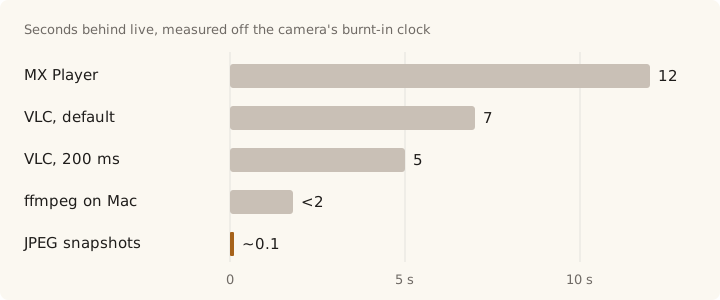
Five seconds, after an evening of work. Better, still bad.
Why video is always late
No amount of tuning fixes this part.
- The buffer is the latency. To play smoothly over an imperfect network, a player has to hold a few seconds in hand. Smoothness and delay are the same dial.
- Compressed video has dependencies. H.264 sends a full keyframe every so often and only changes in between. A player joining mid-stream waits for the next keyframe before it can draw anything.
- Every layer adds a little. Encoder, network stack, decoder. Each is reasonable; they stack.
So three seconds isn’t a misconfiguration, it’s what the pipeline costs. For “is someone at my door right now”, that’s the difference between useful and pointless.
Stop streaming
I didn’t need video. I needed to know what’s out there right now. Almost every IP camera will hand out a single JPEG over plain HTTP from a snapshot URL. Mine came back in 80 milliseconds. No buffer, no keyframe, no decoder. Do that twice a second and it looks live and is current to the second. It isn’t smooth, but smooth was never the goal.
The server is a small Python script on the always-on Mac. /snap fetches one fresh JPEG from the camera, and every other path serves a page that keeps swapping in new ones. With the Mac in the middle, the camera password never leaves it. With RTSP it sat in the URL, the player’s history and the device logs.
Here’s a basic one-camera version, standard library only. Put your camera’s snapshot URL in CAMERA, run it, and open http://<mac>:2288/ on the screen:
from http.server import BaseHTTPRequestHandler, ThreadingHTTPServer
from urllib.request import urlopen

# The camera's snapshot URL. The password lives here, on the server, and nowhere else.
CAMERA = "http://192.168.1.20/snapshot.jpg?user=me&pwd=secret"

PAGE = """<!doctype html><meta name=viewport content="width=device-width">
<style>body{margin:0;background:#000}
img{position:fixed;inset:0;width:100%;height:100%;object-fit:contain}
.off{visibility:hidden}</style>
<img><img class=off>
<script>
let [current, next] = document.images;
const tick = () => { next.src = "/snap?t=" + Date.now(); };
const swap = () => {              // show the new frame only once it has decoded
  next.className = ""; current.className = "off";
  [current, next] = [next, current];
  setTimeout(tick, 500);
};
current.onload = next.onload = swap;
current.onerror = next.onerror = () => setTimeout(tick, 500);
tick();
</script>"""

class Handler(BaseHTTPRequestHandler):
    def do_GET(self):
        if self.path.startswith("/snap"):
            with urlopen(CAMERA, timeout=3) as r:
                body, kind = r.read(), "image/jpeg"
        else:
            body, kind = PAGE.encode(), "text/html"
        self.send_response(200)
        self.send_header("Content-Type", kind)
        self.send_header("Cache-Control", "no-store")
        self.end_headers()
        self.wfile.write(body)

ThreadingHTTPServer(("", 2288), Handler).serve_forever()
The one non-obvious bit is flicker. Reassigning img.src every 500 ms blanks the image while the next one loads, and you get a strobe. So the page has two images: the next frame loads into the hidden one, and swap only shows it once it has fully decoded. A frame that fails to load is skipped and the loop tries again. My real version takes a list of cameras and stacks them, but it’s the same idea.
Measured the same way as before, the screen and a snapshot taken on the Mac at the same instant show the same second. Twelve seconds to none.
When RTSP is still right
| Snapshots | RTSP | |
|---|---|---|
| Latency | ~0.1 s | 3–12 s |
| Smoothness | 2 fps | Full frame rate |
| Bandwidth | ~2 Mbit/s per viewer | ~1 Mbit/s |
| Audio and recording | No | Yes |
| Weak hardware | Fine | Needs a decoder |
Snapshots are for “what’s there right now” on a glanceable screen. RTSP is for watching, recording and sound. Bandwidth is actually worse with snapshots, since JPEGs don’t share data between frames. On a home LAN, trading bandwidth for latency is a good deal.
The lesson I’ll keep: I spent an evening tuning buffers to get from 12 seconds to 5, and an hour of dropping video got me to zero. The best fix was upstream of everything I’d been adjusting.
As with the rest of this series, the measuring, the dead ends, the Python and the debugging all happened in a terminal conversation with Claude Code.